Wednesday, December 11, 2024

PDF form field rename tools

Here’s a quick overview of some popular tools that can help you rename PDF form fields, ranging from free and simple to more advanced paid options.

Gavel PDF Unlocker and Field Renamer

A free, easy-to-use tool that doesn’t require any authentication. It automatically renames fields to match the word listed beside the field.

https://start.gavel.io/pdf

pdfFiller

It can rename form fields, but you need to create an account with them to use this feature. Once you've registered, you'll need to commit to at least a 30-day free trial in order to download your document, and you’ll be required to provide payment information. The cheapest plan starts at $8 per month.

https://www.pdffiller.com/

Try67 Tool Rename PDF Fields

This isn't a web app but a desktop Java application (Java must be installed). The tool costs $5 for the basic version, or $10 for the more advanced version. Alternatively, there's an Acrobat script available for $20.

https://www.try67.com/tool/easily-rename-pdf-fields


Let me know in the comments if I've missed any other tools!


Sunday, December 8, 2024

Software development on a touch phone (1)

I recently came across a guy with a GitHub repository boasting over 1.5K stars. His Neovim plugin is written and maintained entirely on Neovim. The punchline? He's developing on a touch phone because he doesn't own a computer—or even a physical keyboard! [1]

I found this inspirational, so I decided to try out development on a smartphone myself. Here's my "Hello, World!" in Python using Flask (video is at 4x speed). Later, I installed Neovim and ordered a Bluetooth keyboard.


[1] https://www.reddit.com/r/neovim/comments/1h7vhmg/bro_been_developing_his_2k_star_plugin_on_a/

Saturday, December 7, 2024

My neovim configuration for python development (2)

This Neovim configuration differs from the previous one, as it is optimized for a text terminal with limited colors (I couldn't find a suitable color scheme). The Python code completion plugin is compatible with Neovim version 0.7 (currently supported by Debian), and no plugins are used for split-screen terminal functionality.

" https://www.youtube.com/watch?v=wzrZPcwh-bE
 
set encoding=utf-8
set number
syntax enable
set noswapfile
set backspace=indent,eol,start

set tabstop=4
set softtabstop=4
set shiftwidth=4
set expandtab
set autoindent
set fileformat=unix

set colorcolumn=80
highlight ColorColumn ctermbg=9

call plug#begin()

Plug 'jiangmiao/auto-pairs'
Plug 'preservim/nerdtree'
Plug 'vim-airline/vim-airline'
Plug 'vim-airline/vim-airline-themes'

" https://www.youtube.com/watch?v=JWReY93Vl6g
Plug 'preservim/tagbar'

" https://jdhao.github.io/2018/12/24/centos_nvim_install_use_guide_en/#auto-completion-plugin-deoplete
Plug 'shougo/deoplete.nvim', { 'do': ':UpdateRemotePlugins' }
Plug 'zchee/deoplete-jedi'

call plug#end()

let g:airline_powerline_fonts=1
if !exists('g:airline_symbols')
    let g:airline_symbols = {}
endif

" NERDTree
let NERDTreeQuitOnOpen=1
let g:NERDTreeMinimalUI=1
nmap <F2> :NERDTreeToggle<CR>

" Tagbar
nmap <F3> :TagbarToggle<CR>

let g:deoplete#enable_at_startup = 1

" https://www.reddit.com/r/vim/comments/8n5bzs/comment/dzt3fix/
" Terminal Function
let g:term_buf = 0
let g:term_win = 0
function! TermToggle(height)
    if win_gotoid(g:term_win)
        hide
    else
        botright new
        exec "resize " . a:height
        try
            exec "buffer " . g:term_buf
        catch
            call termopen($SHELL, {"detach": 0})
            let g:term_buf = bufnr("")
            set nonumber
            set norelativenumber
            set signcolumn=no
        endtry
        startinsert!
        let g:term_win = win_getid()
    endif
endfunction

" Toggle terminal on/off (neovim)
nnoremap <F4> :call TermToggle(11)<CR>
inoremap <F4> <Esc>:call TermToggle(11)<CR>
tnoremap <F4> <C-\><C-n>:call TermToggle(11)<CR>

" Terminal go back to normal mode
tnoremap <Esc> <C-\><C-n>
tnoremap :q! <C-\><C-n>:q!<CR>


Saturday, November 30, 2024

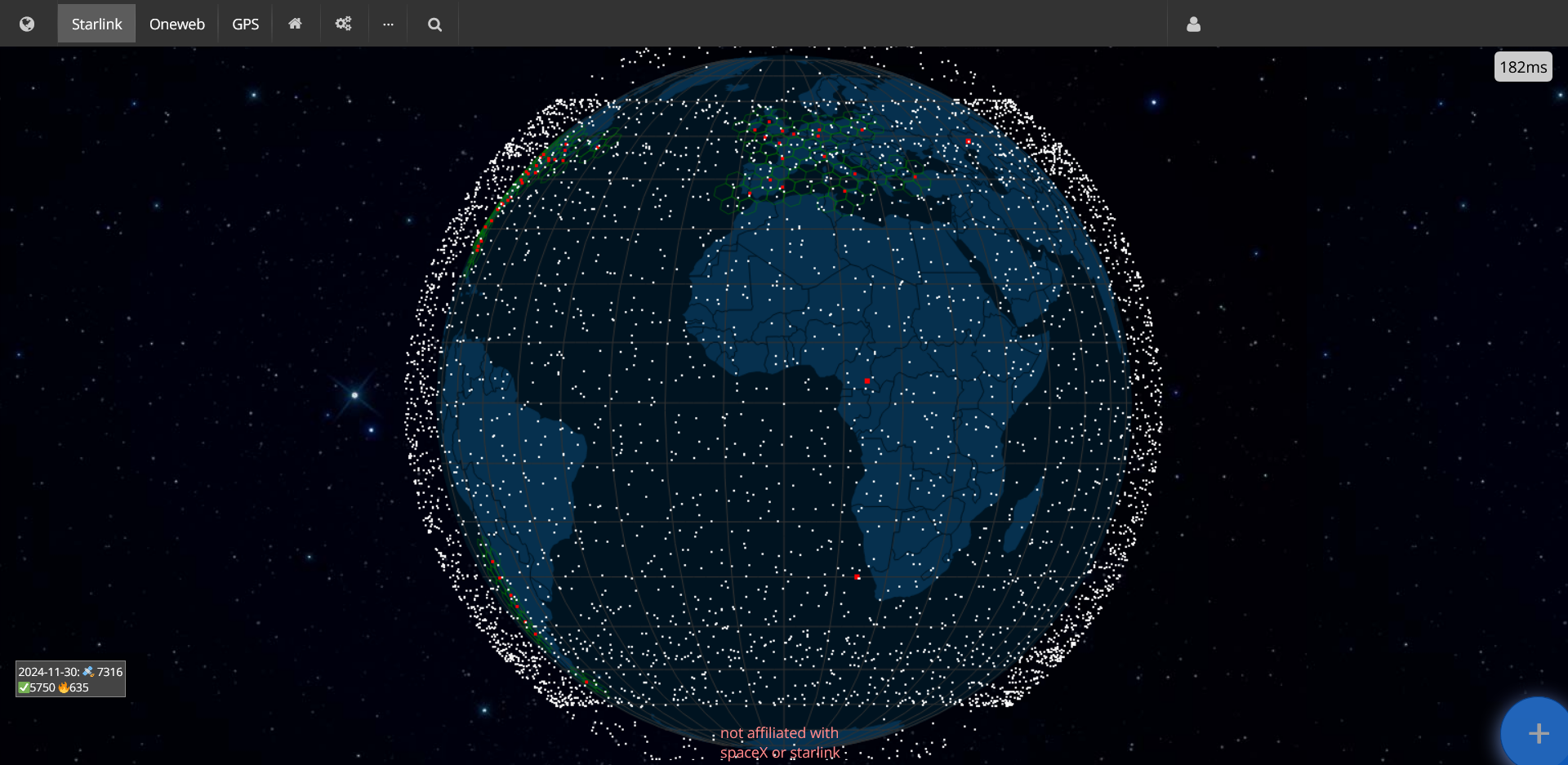
Real time satellite tracking

LeoLabs Low Earth Orbit Visualizer

LeoLabs web
LeoLabs LinkedIn company profile
Bloomberg Business video - How LeoLabs Is Using New Tech to Target Space Junk [17:36]

Company overview

LeoLabs is the world’s leading mission partner for persistent Orbital Intelligence. We enable military space commands, civil government agencies, and commercial operators to confidently detect, track, characterize, and respond to threats in space. Our proliferated, multi-mission radar network, real-time orbital data catalog, and AI-powered analytics support secure, safe, and dynamic space operations. We are committed to delivering the living map of activity in space that safeguards our way of life on Earth. 

Services

  • LeoTrack - foundational satellite tracking service that enables automated, independent monitoring for fleets of any size.
  • LeoSafe - tailored collision avoidance service providing real-time conjunction alerts to ensure operational safety of flight.
  • LeoLaunch - on-console support service for locating and identifying newly launched payloads.
  • LeoRisk - comprehensive mission risk assessment service for intelligent business planning – serving insurers, investors, and owner-operators.

Visualizer

LeoLabs Low Earth Orbit Visualizer tracks payload (satellites), rocket bodies, debris and unknown things orbiting around Earth, in real time. Your IP address has to be in US in order to access it.


SatelliteMap.space

Link

Showing 'only' Starlink, OneWeb and GNSS (that they named GPS) satellites. 


OrbTrack.org

Link


Satvis.space

Link
GitHub

This one allows you to select several constellations for monitoring. You can also choose between 2D and 3D view, select playback speed, play backwards or forwards into the future.


Satellite Tracker 3D

Link

Awesome satellite tracker built by a single person as a side-project.


Saturday, November 9, 2024

Summer of 2024 swimming

For my personal record: summarizing this summer’s swimming spree, which started later than any previous year — July 1 — and finished November 1.
  • 49 swims × 2.5 km
  • 12 swims × 1 km
Total: 134.5 km — actually not a personal record. Hope to virtually visit Italy again next year.
 
PS: total 697 km since 2021.


Thursday, November 7, 2024

Quoting email body text

Occasionally, I need to quote text in an email that I originally received through another channel. For instance, imagine you have an online form submission that gets recorded in a spreadsheet, and you want to reply to the submission via email. In a case like this, you’d copy the text from the spreadsheet, paste it into your email client, and prepare your response. To make the reply look 'natural', you might want to quote the original text with the '>' character and perhaps wrap the lines at around 50 characters for readability. Here’s a Bash one-liner that accomplishes this:

cat noquotes.txt | fold -s -w 50 | sed 's/^/> /'

You're welcome!


How to remove credit card from LinkedIn

You can remove your credit cards at the following URL:
https://www.linkedin.com/manage/purchases-payments/payment-methods

Not sure if there is a link to that page from your LinkedIn profile or it's settings.

You're welcome!